TRIGGON Open in Telegram
Manual Provider · Forex

Forex Manual Provider guide: currency-pair Signals from the Signal Terminal, inside market hours.

A forex Manual Provider needs no TradingView, no MetaTrader 5 and no broker connection to publish on Triggon. What the route does need you to understand is the market itself as Triggon serves it: which pairs are enabled, that the market has hours, that a price must be fresh to be traded on, and that leverage on broker margin is a band you declare and are held to. This page is the whole route in order.

This route is open for applications right now.

Is this your route?

Yes, if

You trade currency pairs on your own judgement, you can state your rules, and you want distribution and a record without automation. Whether you also trade on MetaTrader 5 or any other terminal is your business; Triggon connects to none of them.

Algo instead, if

Your Strategy runs as a Pine Script Strategy on TradingView. The forex Algo guide → Note that a MetaTrader 5 Expert Advisor is not a Signal source on either route.

Another market, if

Same route, different guide: crypto, stocks, commodities (gold is a commodity on Triggon, not a currency pair).

Your roadmap

Nine steps; five before the application, four inside Triggon. The application's route screen shows the same list.

  1. Write your Strategy downbefore you apply

    Its markets, timeframes, trading styles, leverage band, take-profit method and the most you risk on one position. The application asks for exactly these, and the Signal Terminal enforces them.

  2. Choose the symbols you will tradebefore you apply

    The symbols you register are the only ones your Signal Terminal will offer. Enabled today: EURUSD. Up to 1 per application.

  3. Decide your risk settingsbefore you apply

    The maximum capital risk per position and the leverage band you declare are checked on every Signal you send. Declare what you actually do.

  4. Prepare your Provider profilebefore you apply

    Your public name, a one-line summary, a full description, optional links and images. Subscribers read this before they subscribe.

  5. Review pricing and feesbefore you apply

    The Hub creation cost, its validity period, the minimum subscription prices for this market and the platform fee are all stated before you apply, from the current platform settings.

  6. Complete the applicationin Triggon

    The form collects what you prepared and validates it. The Hub creation cost is charged from your Triggon wallet when you submit.

  7. Wait for admin reviewin Triggon

    An admin approves, asks for revisions or rejects, always with a reason. Resubmitting after a revision request is free.

  8. Run the pre-live previewin Triggon

    After approval: open the Signal Terminal in your Provider Hub, preview one Signal end to end, then press Go Live.

  9. Publish and build your recordin Triggon

    Go Live lists the Strategy on the Marketplace with the price and seats you set. Every Signal from then on is recorded permanently.

1. Write your Strategy down

InstrumentSpot FX on broker margin, or the leveraged broker product (margin or CFD). Both are leveraged; neither is an exchange-listed currency future, which Triggon does not offer.
TimeframesUp to six, from 5m upwards. The live price for this market can be up to about two minutes old at the source, so a shorter bar is not offered.
Trading stylesUp to three from Triggon's list. Your Strategy appears under each in the Marketplace filters.
Sessions and activitySydney, Tokyo, London, New York or all of them; your timezone; your off days. Declaring the sessions you really trade is what tells subscribers when to expect you.
Take-profit methodFixed, dynamic or multi-level; the targets themselves are chosen per Signal.
Position modeOne-Way, or Two-Way hedge where a broker account model allows a long and a short at once.

2. The pairs you register, and the market's rules

Enabled nowEURUSD. A pair is opened only when its live price, charts and contract specification are all in place; other pairs on the list show greyed in the application.
Per applicationUp to 1. The registered pairs are the only buttons your terminal has.
SpellingSix letters, as Triggon lists it: EURUSD. Broker suffixes from other terminals do not apply.
Market hoursForex is closed at the weekend. A Signal attempted on a closed market is refused with that reason. Plan your sessions inside the week.
Price freshnessEvery Signal is priced by a live fetch at the moment you send. If the freshest price available is older than the market's limit, the Signal is refused rather than built on a stale number, and you are told to try again in a moment.
UnitsPosition size is a percentage of the simulated capital. The terminal labels it in lots for this market, but the number stored and enforced is the percentage; the lot-equivalent is a read-out.
3. Your risk and leverage settings, and what the terminal enforces

Maximum capital risk per position

The most of the simulated capital a single position may lose at its stop, as a percentage. The terminal shows the risk of every stop you set; one above your declared cap is refused, and so is one at or past the position's liquidation price.

Leverage band

No leverage, a fixed multiplier, or a range, up to 500×. Spot FX is on broker margin, so a band applies to Spot too. The terminal keeps the leverage control inside it.

Size and the simulated account

Each Signal's size is a percentage of the simulated capital, which starts at $10000 and is replayed from your positions. An entry the account cannot afford is not opened.

Price drift

The price you saw while composing and the price fetched at send must agree within a small tolerance; otherwise the Signal is refused rather than sent on a number you did not decide on.

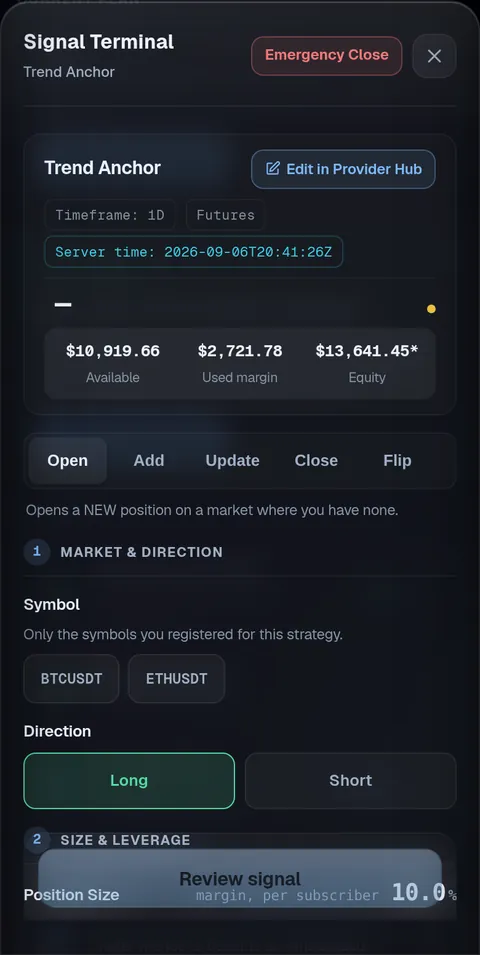
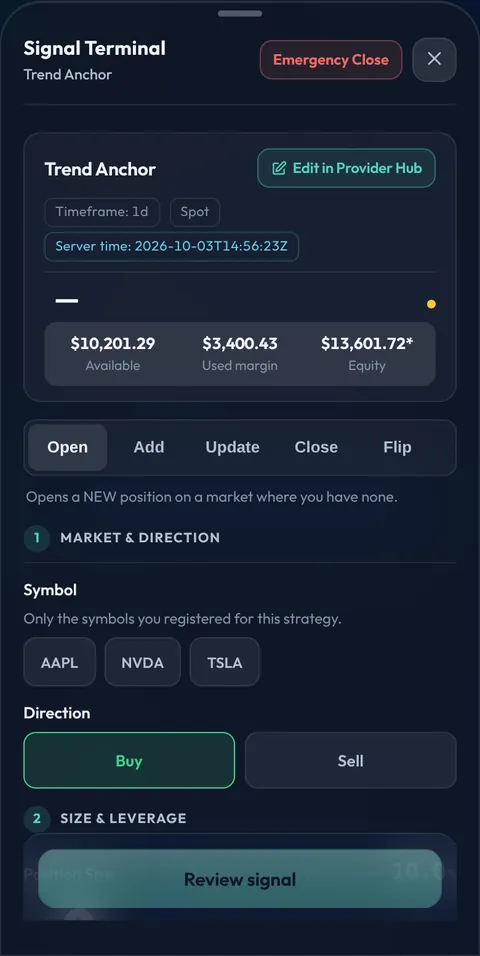
The Signal Terminal in the app, opened on a Manual Strategy: the market and the simulated capital in the header, the Open, Add, Update, Close and Flip actions, then the numbered steps: market and direction, size and leverage, stop and targets.
The Signal Terminal (the app as it is today)

How a Signal is created

  1. Pair and direction. Tap a registered pair, choose long or short.
  2. Size and leverage. The percentage of capital and the multiplier, inside your band.
  3. Stop and targets. Drag them on the live chart or type them; the risk is shown against your cap.
  4. Send. Triggon fetches the live price, confirms the market is open and the price fresh, runs every check, records the Signal and delivers it.
  5. Manage it. Update, add, take partial profit, close or flip, each its own Signal.

4. Your Provider profile

Identity

Your name, email and country come from your Triggon Profile and are shown read-only in the application.

The Strategy, described

A unique English name, a one-line summary, a full description, a risk level. Say how you trade; this is what a subscriber reads before deciding.

Links and images

Optional website and social handles, a logo, a banner, a profile picture and a cover image.

Nothing to upload. No backtest export and no script screenshot are asked for on the Manual route. An optional report may be attached; it is not required.

5. Pricing and fees on the forex route

Read live from the platform settings, per category.

Hub creation cost$7, charged from your Triggon wallet when you submit. It is the application fee and buys the Strategy's Hub 1 month(s) of validity from approval. Not refunded; a resubmission after a revision request is free.
Minimum subscription pricesMonthly $8.51, quarterly $25.26, yearly $100.48. Maximum $10,000.
Platform fee15% of each subscription; you keep 85%.
Keeping the Hub validA sale that runs past the Hub's validity tops it up automatically from that sale at the current rate. You can recharge yourself at the current rate. An expired Hub stops new sales and Go Live until recharged.
Seats10 to 1000 subscribers, changeable in the Hub.
Cancellations and refundsUnused value is released to a cancelling subscriber under the published rules. The rules →
Worked example, from the current rules

One monthly subscription at $29

Subscriber pays$29from their Triggon wallet
Platform fee 15%$4.35kept by Triggon
You receive$24.65to your Provider wallet

An illustration computed from the live fee rate, not a forecast or a guarantee. Actual earnings depend on filled seats, cancellations and refunds, promotions, and any automatic Hub top-up. What decides what you earn →

6. The application

Opened in Telegram. It confirms the route you chose here, links this guide on every step, shows no webhook, API or platform field, and labels the venue field Broker.

What it asks, on this route

Provider info, then the Strategy: name, summary, description, styles, risk level, market: Forex (fixed from your route), Spot or the leveraged product, position mode, the pairs from the picker, your broker (optional), timeframes, the leverage mode and band, the take-profit method, the maximum capital risk per position, prices and seats. Then branding, operations (cadence, timezone, sessions, off days, optional footer), and the review.

What it does not ask

No backtest export, no script screenshot, no terminal login, no broker credentials, no connection details, no take-profit ladder, no drawdown claim.

Save and resume

Every step is saved on the server; leave and return with your route, market and answers preserved. Nothing sensitive is stored in your browser.

Before you can submit

The checklist at the end of this page, confirmed item by item, and the fees shown once more. Then Submit and Pay.

7. After you submit

  1. Submitted. The Hub creation cost is charged and the application locks for review.
  2. Admin review. Approved, revisions requested (resubmitting is free), or rejected, each with a written reason. What is reviewed →
  3. Approval. Provider profile and earnings wallet created, Strategy provisioned as Pending, Hub created with the validity you paid for, counting from now.

8. Your Provider Hub and the pre-live preview

  1. Open the Signal Terminal from Account → Provider Hub, during market hours. Your registered pairs are its buttons.
  2. Preview one Signal end to end. It runs every check the real Signal would pass, including the live-price fetch. Nothing reaches a subscriber and nothing counts towards your record.
  3. Press Go Live. Your Strategy is listed on the Marketplace with the price and seats you set.

9. Publishing, subscribers and your responsibilities

What publishing means

Every Signal from Go Live on is permanent and public. Your share of each subscription lands in your wallet. After 20 closed trades over 30 live days the Strategy is ranked by its Triggon Score.

What we ask of you

Complete Signals with a stop and at least one target, managed to a close, sent within the sessions you declared. Positions left open over a weekend are yours to manage when the market reopens.

What you can change

Prices (above the minimum), seats, pausing, Hub recharges: yourself. Description, links, images and declared trading facts: reviewed first.

What is fixed, and one difference

The route (Manual), the market (forex) and the instrument type are fixed at application. Automatic execution is reserved for Algo Strategies: your subscribers act on your Signals themselves.

Ready to apply? The checklist

The items the application asks you to confirm before Submit and Pay on the forex Manual route.

  • My Strategy rules, timeframes and styles are written down and match what I declared.
  • The symbols I selected are the ones this Strategy actually trades.
  • I understand this market has trading hours and that a stale or closed-market price is refused.
  • My risk cap and leverage band are what I really use; every Signal is checked against them.
  • My Provider profile (name, summary, description, links) is complete.
  • I have reviewed the minimum prices, the platform fee and my share.
  • I understand the Hub creation cost is charged now, buys a validity period, and is not refunded.
  • The information in this application is accurate and mine to publish.