TRIGGON Open in Telegram
Strategy marketplace · inside Telegram

Follow trading strategies whose every trade is on record.

Triggon is a marketplace of trading Strategies that runs inside Telegram, across crypto, forex, stocks and commodities. Every trade is written to a Strategy's public record the moment its Signal fires, so you read the full history, losses included, before you subscribe. Get each Signal in Telegram, or let Auto-Trade place it on your own exchange account within limits you set.

See a strategy's record ↓

Run a strategy yourself? Publish it on Triggon →

Recorded at open, not after close Your funds stay on your exchange A key that can withdraw is refused

Sample figures, shown to illustrate the feed and the record. Live signals, entries, targets and stops are visible to signed-in members.

The problem

A screenshot of last week's winners is not a track record.

A published result means what the moment it was written down allows it to mean. Triggon writes every position to the record at the moment the Signal fires, before anyone knows how it will end. There is no step at which a losing trade could be left out, relabelled or backdated. Stop-outs, losing months and quiet weeks are all in the history, because a record without them is not one.

How it fits together

One Strategy. Many Signals. One permanent record.

A Strategy is a named trading approach run by a Provider, with the markets it trades declared up front. Each Signal it sends is a complete instruction: market, direction, entry, stop loss and take-profit levels with their sizes. Later Signals manage the position: add to it, move the stop, take partial profit, close. Every one of them is recorded, and the closed trade joins the Strategy's public history.

Momentum Core · BTCUSDT · one positionStrategy → Signals → record
entry

Long at 63,420. Stop 61,900. Targets 65,100 (50%) and 66,800.

update

The stop is moved up to 63,400. A stop-out would now close above the entry.

tp_hit

Target one reached. Half the position closes at 65,100.

close

The rest closes at 66,200. The trade joins the record.

Also expressed: pyramidreducesl_hitseven Signal types, one position lifecycle
Record · BTCUSDT · LONG · 4H · closed +3.4% · recorded 14:02:11 UTC
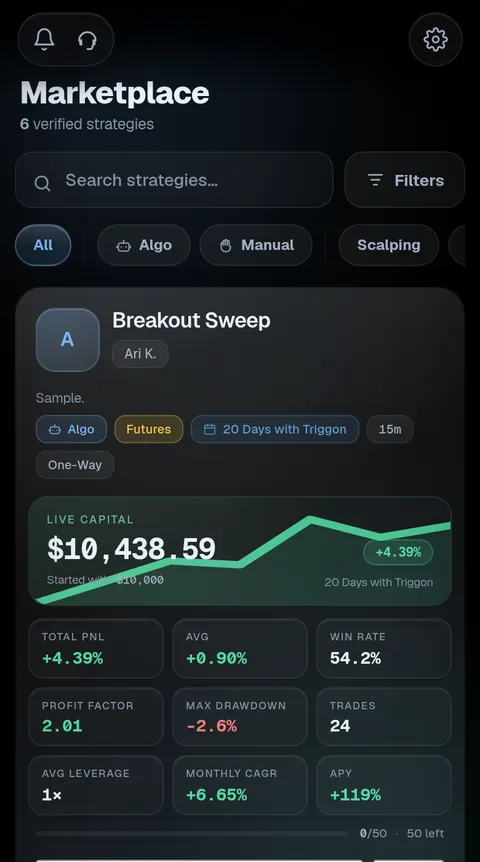
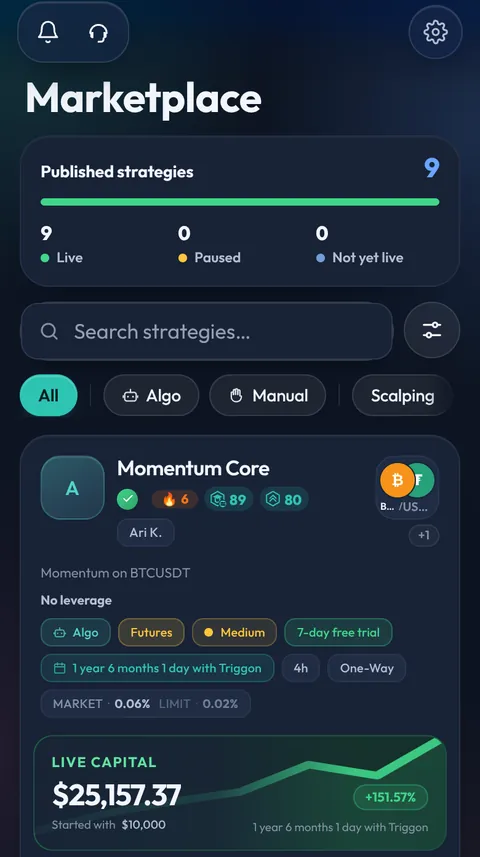
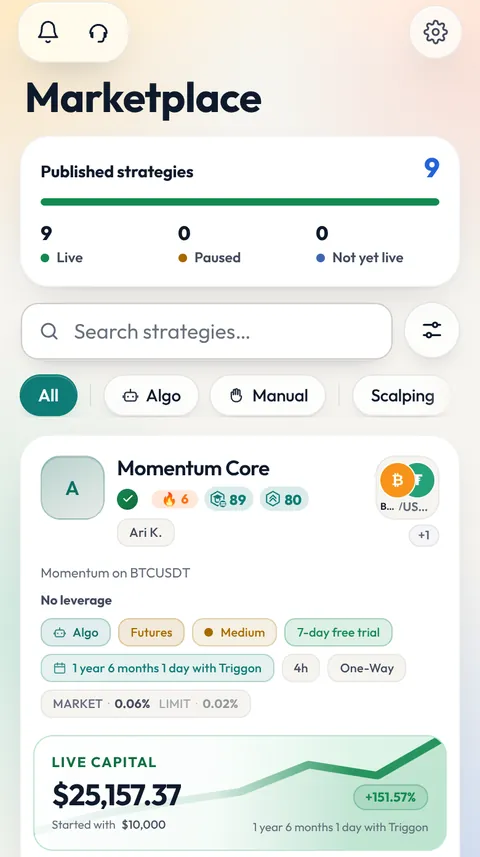
The Marketplace in the Triggon app: verified Strategies, each with its live-capital curve, total PnL, win rate, drawdown, trades and the seats left.
Marketplace
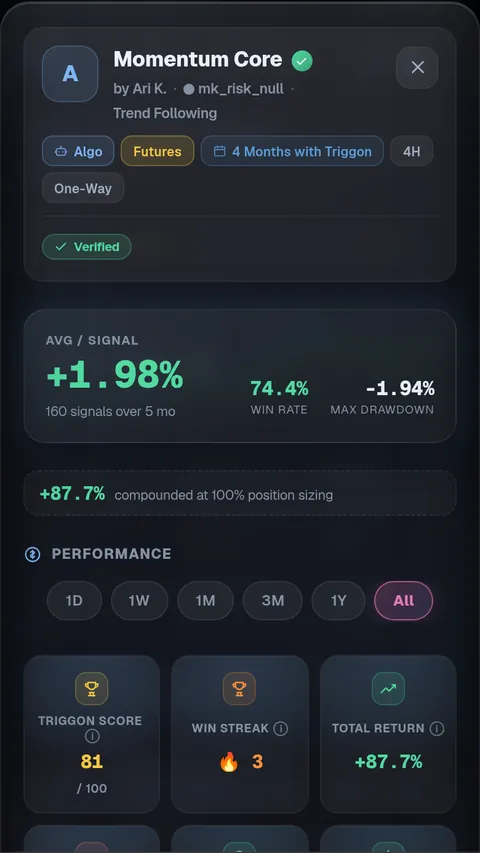
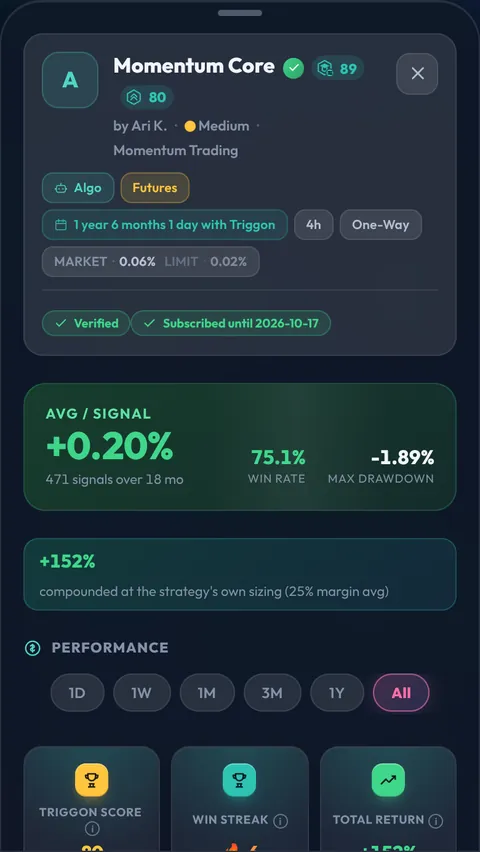
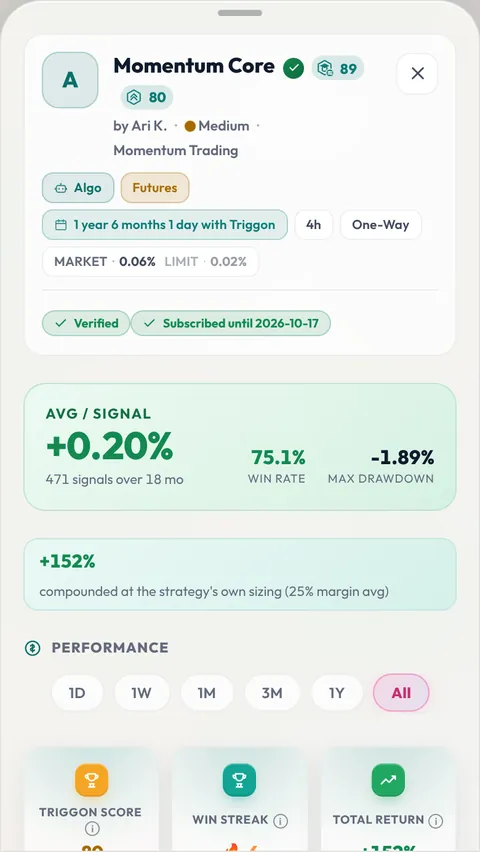
A Strategy's page in the app: the Verified badge, average return per Signal, win rate, maximum drawdown, and the performance range picker.
A Strategy's record
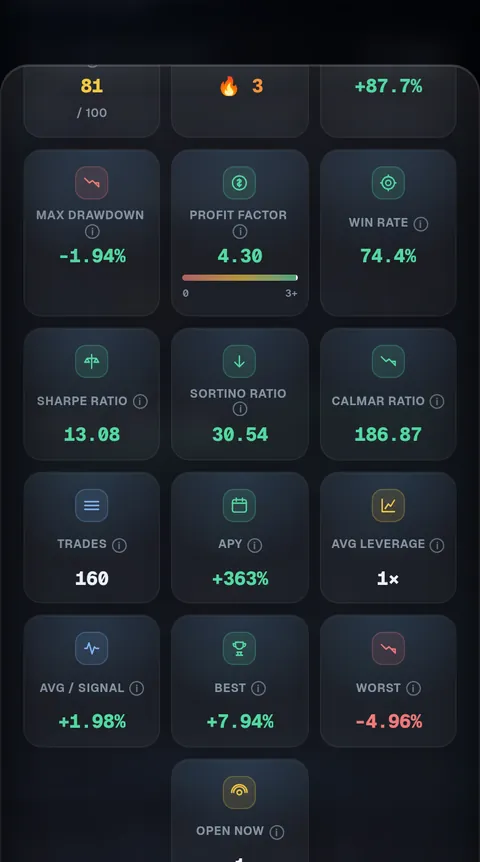
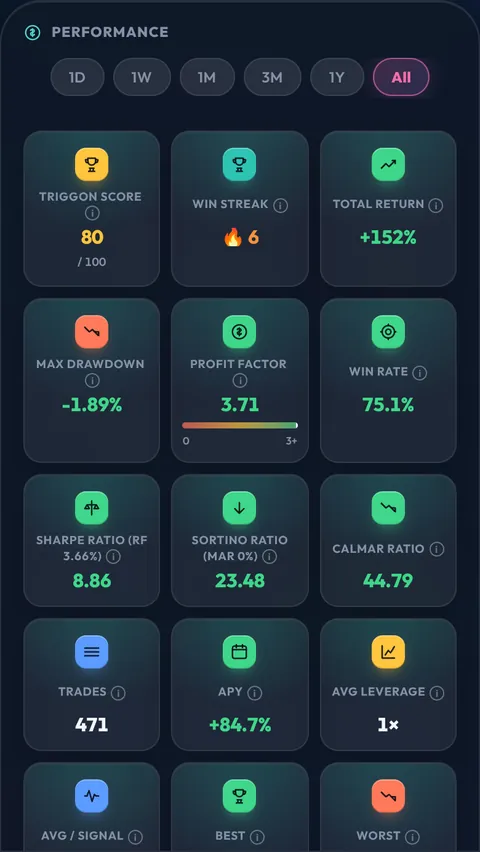
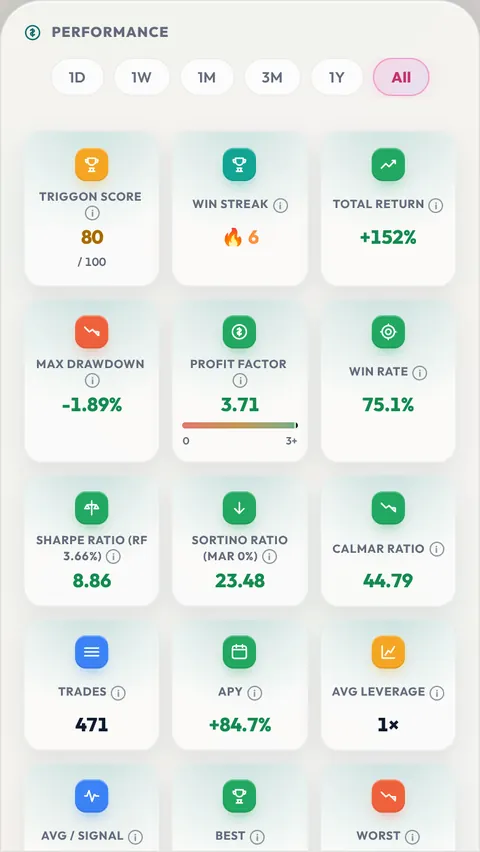
The performance view of a Strategy: drawdown, profit factor, win rate, Sharpe, Sortino and Calmar ratios, trades, APY, wins and losses, and the cumulative PnL curve.
Performance, all time

Screens from the Triggon app. Strategy names and figures on them are sample data.

For Providers

Providers publish. Triggon distributes, records and pays.

Independent traders and teams run the Strategies. A Provider declares the markets, sets the subscription price and the number of seats, publishes under their own profile, and keeps 85% of every subscription, paid into the wallet they withdraw from. Delivery to subscribers, performance reporting, billing and payouts already exist. The Provider supplies the Strategy.

Two ways in: connect a TradingView Strategy, or send Signals by hand from the Manual terminal. Both are reviewed the same way, listed on the same Marketplace and measured by the same numbers.

Neither route reaches the Marketplace by being created. Every Strategy is reviewed by a person and has to pass a live gate first. How a Strategy is reviewed, verified and published

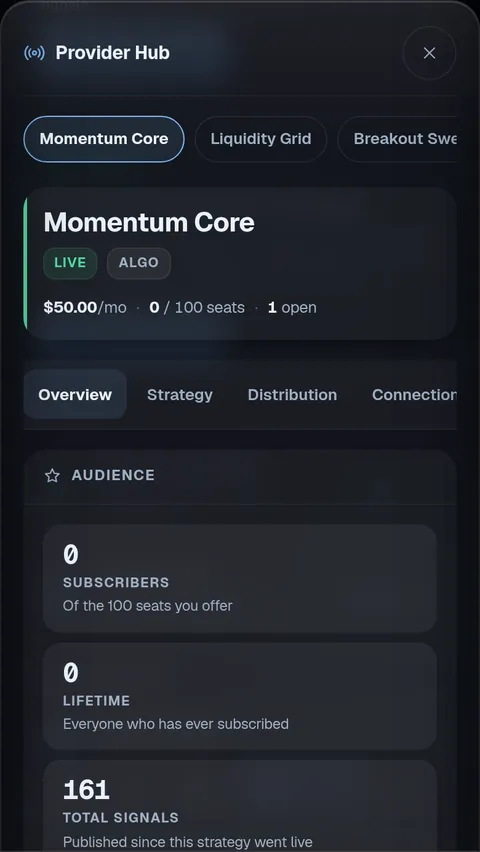
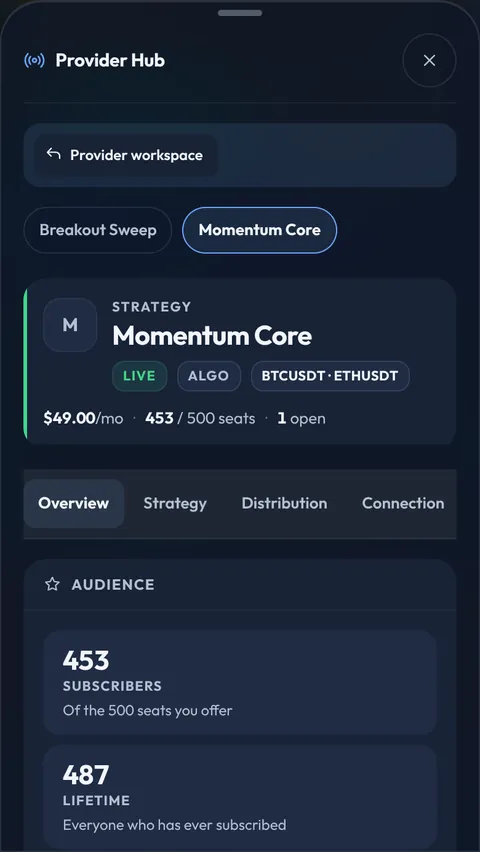
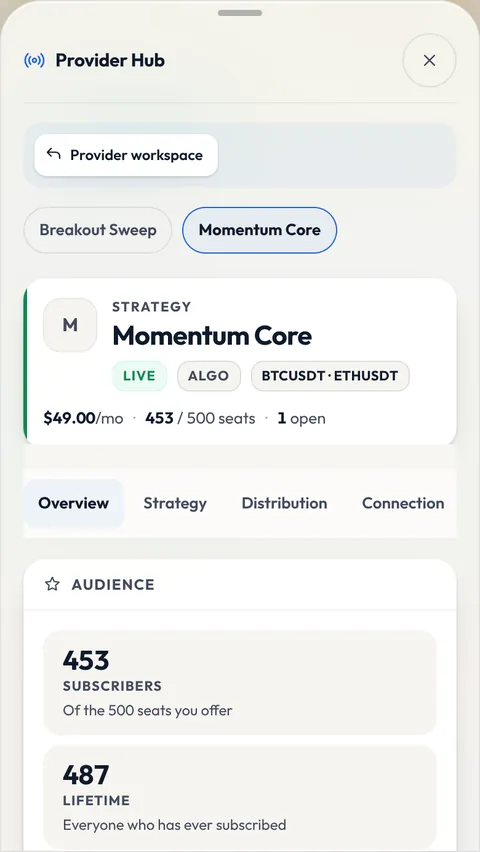
The Provider Hub's Overview in the app: the Strategy's name with its Live and Algo badges, the price, the seats and the open positions on one line, the five tabs, and the audience tiles.
Provider Hub · Overview
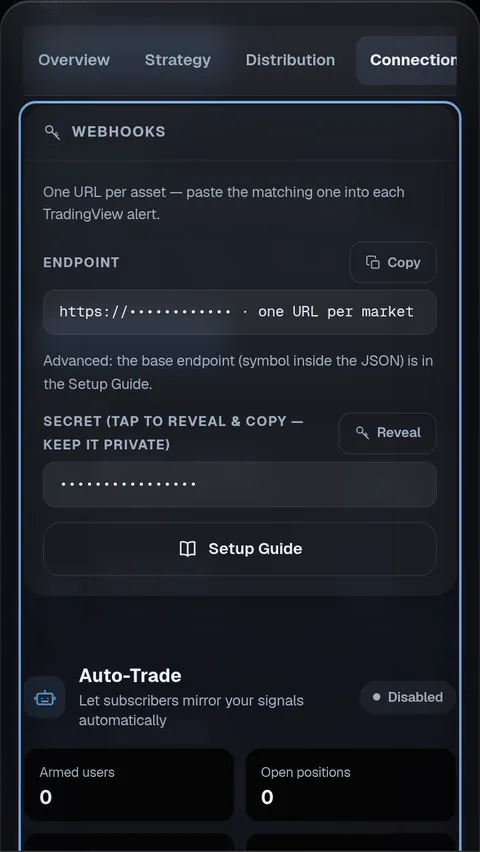
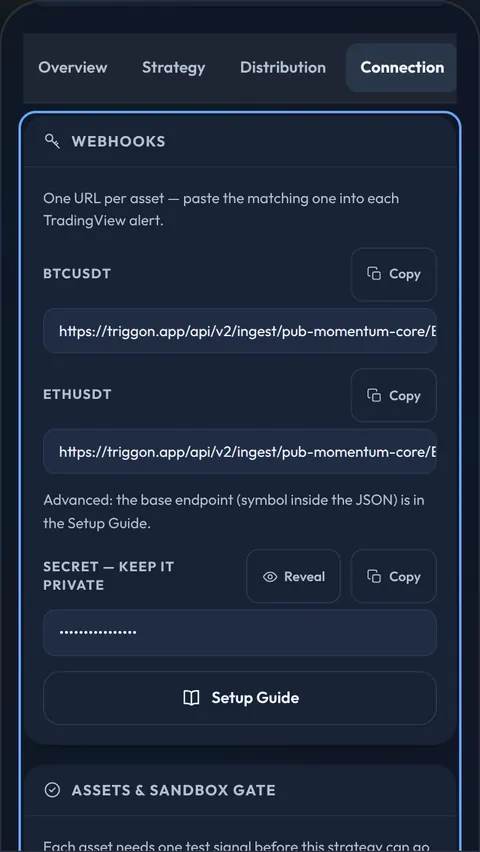
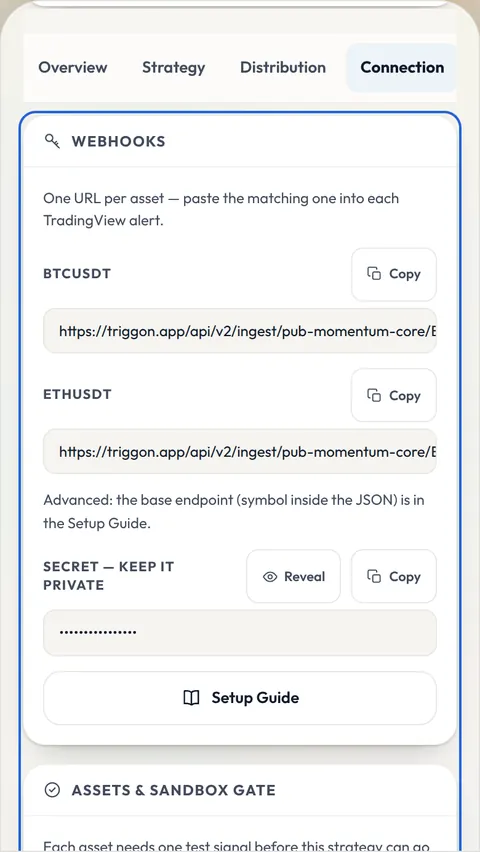
The Provider Hub's Connection tab: one webhook URL per market with a Copy button, the masked secret with a Reveal button, and the Setup Guide.
Provider Hub · Connection
Review, go-live, and the checkmark

Verified means reviewed, tested, and on record for 90 days.

A Strategy cannot list itself. A person reads the application and approves it, asks for revisions, or rejects it with a written reason. Before it can go live, the Strategy has to prove it produces a valid Signal for every market it declared. The blue checkmark appears only when Triggon holds an unbroken record across the last 90 days with no silence longer than 21 days, and it is re-checked every time it is shown. Stop trading and it goes. Start again and it comes back.

Verified does not mean profitable. A Strategy that has lost money every month still carries the checkmark. It tells you the losses in front of you are real.
The checkmark is a rolling windowlast 90 days · 21-day max gap
✓ coveredongapofftrading againback once the window is covered
Before you subscribe

Read the whole record before you pay for anything.

Every Strategy page shows its full trade history, its risk metrics, its Triggon Score, the Provider behind it, and how many seats remain. Nothing sits behind the subscription. Start with maximum drawdown, not return: ask whether you could have held through the worst stretch. Check the trade count and days active. Then read win rate and profit factor together, because either alone can flatter a Strategy the other exposes.

How to read the numbers →
Performance & analytics

Every number, computed from trades recorded when they opened.

Total return and PnL, win rate, profit factor, expectancy, best and worst trade, maximum drawdown, and the Sharpe, Sortino and Calmar ratios, each one telling you when it is undefined instead of showing a number that means nothing. Switch between 1D, 1W, 1M, 3M, 1Y and All and the whole page recomputes. Run the capital simulator with your own starting balance and position size. The Triggon Score ranks on six published inputs and scales every one of them by how much evidence the Strategy has produced, so a lucky week cannot outrank a consistent year.

Sample
Momentum Core · Performance
+14.2%Return
71%Win rate
1.62Profit factor
1.9Sharpe
2.7Sortino
214Trades
Capital simulatorStart $5,000 · size 10% / trade · leverage $6,570same trades, your sizing
What the Score is made of74
Win rate enters by its lower confidence bound. Every input is scaled by evidence: trade count and days active. A new Strategy is not penalised; it has not yet earned a rank.
Signals

A Signal arrives with the trade, the risk, and the record it came from.

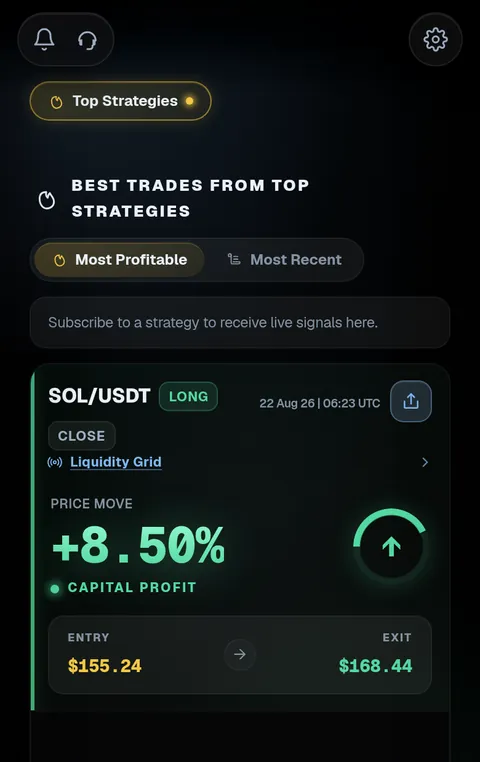
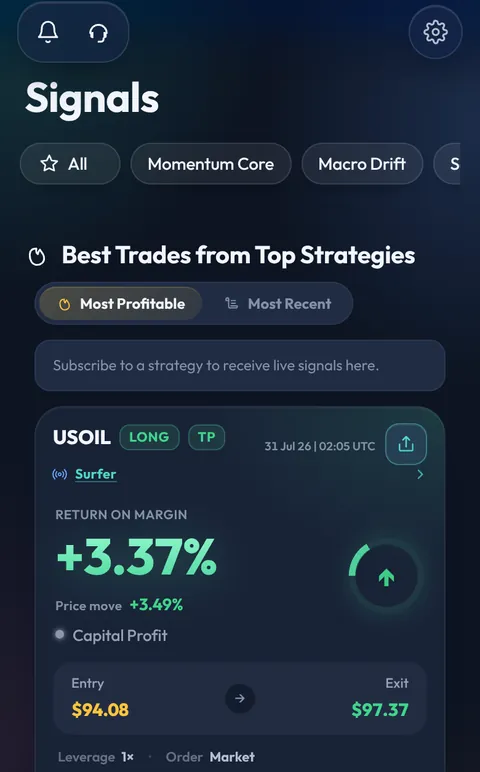
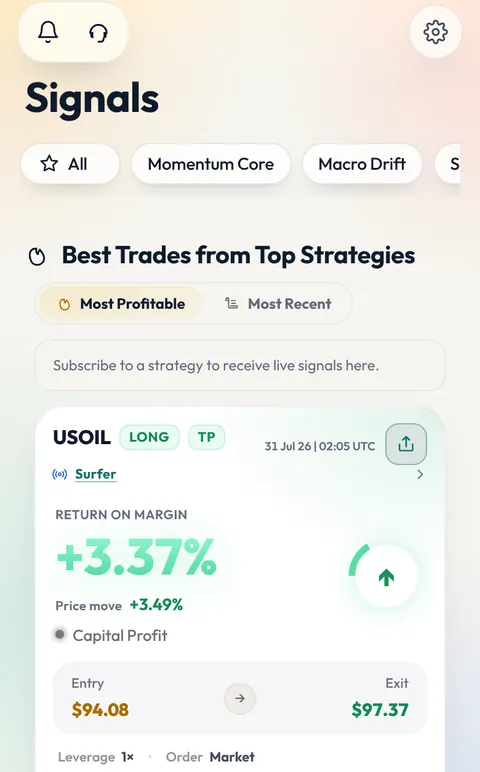
A Signal is not a message that says "buy". It is a structured instruction: market, direction, entry, stop loss, and take-profit levels with the share each one closes. It is checked before it is published: a stop on the wrong side of the price is refused, a replayed alert is ignored, a duplicate is never applied twice. It reaches you as a trade card in Telegram the moment the Strategy fires, and the feed in the app shows what is open and what just closed across every Strategy you follow, with the live price against each position.

Manual Providers

Trade on your judgement. Publish without code.

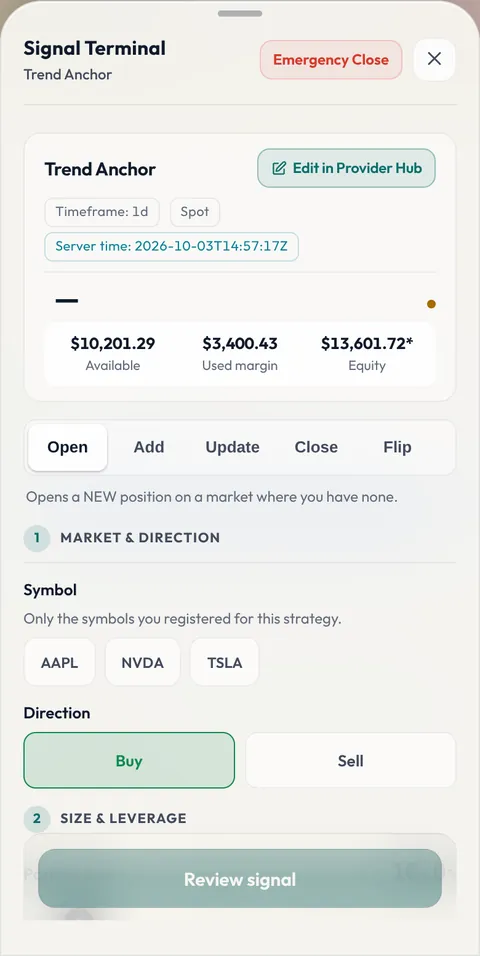
Create a Strategy, then send each Signal from the Manual Signal Terminal: pick the market, the direction, the position size and leverage inside the band you declared, drag the stop and the targets on the chart, preview, send. Triggon stamps the live price and the time, refuses a stop on the wrong side or too close to liquidation, and delivers the Signal to your subscribers the same way an automated one is delivered. Manage the position from the same terminal: move the stop, add, take partial profit, close. Same Marketplace, same metrics, same Score.

One line, stated up front: Auto-Trade is available on Algo Strategies. Manual Signals reach subscribers in Telegram and in the app; subscribers place them themselves.

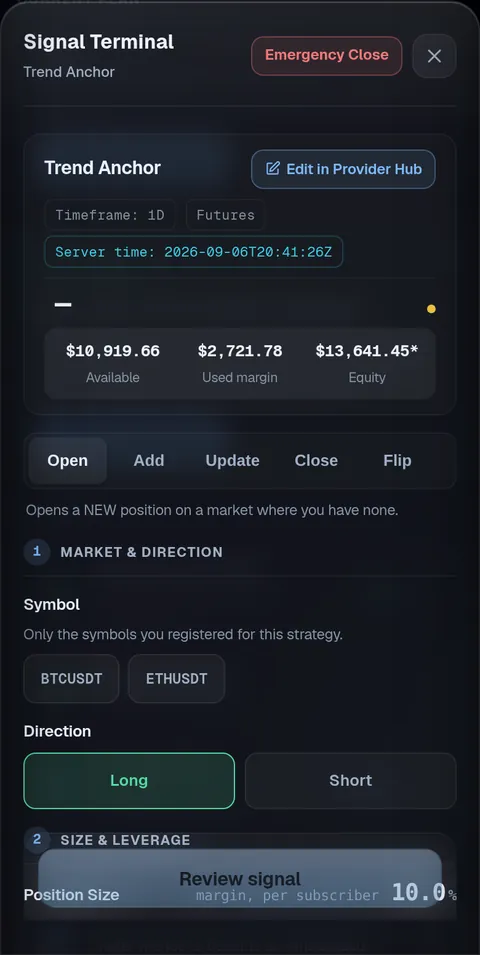
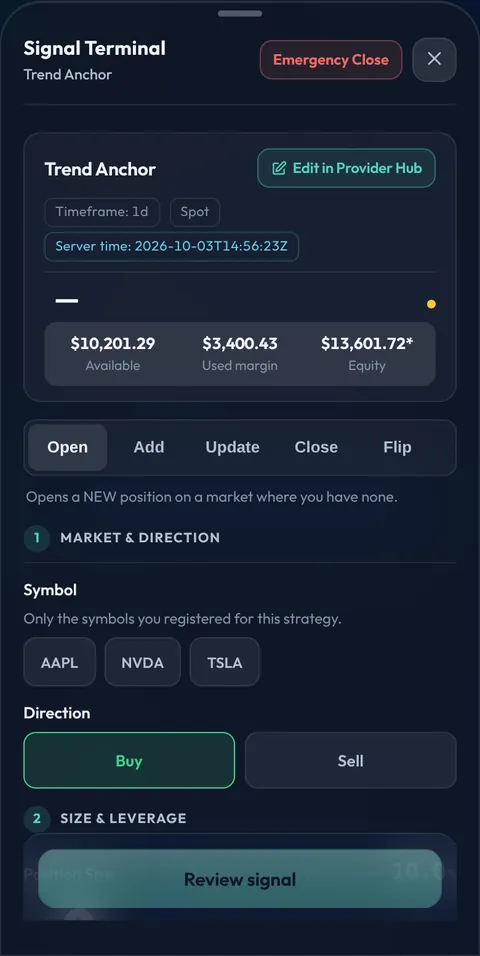
The Signal Terminal in the app, opened on a manual Strategy: the market and the simulated capital in the header, the Open, Add, Update, Close and Flip actions, then the numbered steps: market and direction, size and leverage, stop and targets.
The Signal Terminal
Algo Providers · TradingView & Pine Script

Keep your Pine Script on TradingView. Point its alerts at Triggon.

Your Strategy fires a webhook alert. Triggon validates it, records it and turns it into a Signal for your subscribers, the instant it fires and without you at a screen. Entries, scale-ins, stop and target updates, partial closes, stop-outs and closes all have a matching alert shape. A test mode parses and checks every alert without recording anything, and the Strategy cannot go live until every market it declared has passed. Your source code never leaves TradingView; Triggon only ever sees the alerts.

Auto-Trade · optional · Algo Strategies

Let the Strategies you chose trade your own exchange account, inside limits you set.

Connect an exchange API key that can trade but not withdraw; a key that can withdraw is refused at connection. Set a leverage ceiling and a position size, per Strategy. Nothing trades until you switch it on for that Strategy. Where a Signal and your settings disagree, the lower number always wins. Orders go to your own account within seconds of the Signal, and every automated position appears in the app beside the Signal that produced it. Start on the 7-day Demo window with a sandbox key before you connect a live account.

Built to fail safely: a Signal that has been in transit too long is discarded rather than filled late; an order is never sized from stale market data; a fill too far from the Signal's price is not taken; repeated stop-outs pause new entries; exits are never blocked by any of these, because an open position has to be closeable.

Auto-Trade currently supports Binance, Bybit, CoinEx, LBank and MetaTrader 5. Auto-Trade is a fixed add-on of $10 a month per exchange, never a share of your results.

Strategy Marketplace

Compare Strategies on evidence, not on claims.

Every published Strategy is listed with its return, maximum drawdown, win rate, Triggon Score, checkmark, Provider and seats remaining. Sort by newest, price or Score. Search by name, Provider, market or style, and filter by asset class, spot or futures, Manual or Algo, timeframe and session. Each Strategy admits a fixed number of subscribers set by its Provider, from 10 to 1000; when it is full it closes until a seat frees up. Read the full record, subscribe from your wallet, cancel when it stops working for you.

How subscribing works →
Search name, Provider, market, style…
Momentum Core
+14.2%3M return
−7.5%Max DD
71%Win rate
74Score
Seats 38 / 100$50 / mo · Algo · 4H
Trend Anchor
+18.9%3M return
−11.6%Max DD
66%Win rate
68Score
Seats 100 / 100 · Full$40 / mo · Manual · 1D
Liquidity Grid
+8.8%3M return
−4.1%Max DD
70%Win rate
61Score
Seats 61 / 250$25 / mo · Algo · 1H
Breakout Sweepnew
−3.1%1M return
−6.0%Max DD
59%Win rate
n/aScore · not yet eligible
Seats 12 / 50$30 / mo · Algo · 15m

Sample Strategies. Leaderboard rank needs 20 trades and 14 active days; a losing month stays on the card because the card is the record.

Journals

Every Provider gets a trading journal built from the record. They can share the link.

The journal a serious trader would keep by hand, generated from what Triggon already recorded: performance and equity per Strategy, a trading calendar, winning and losing streaks, timing by session and hour, breakdowns by market, side and exit reason, what the Score is made of, and every trade. It computes nothing new, so it can never disagree with the Marketplace. A Provider switches sharing on and anyone with the link can read it: no account, no app, and it prints.

triggon.app/journal/••••••••Sample

Journals are server-rendered pages: readable without JavaScript, printable, and indexable when the Provider shares them.

Security

Triggon never holds your funds, and cannot move them.

Your Telegram account is the login: Telegram signs every request and there is no Triggon password to leak. Exchange keys are encrypted with AES-256-GCM before they are stored, the master key lives only in the server's environment, and if it is missing Triggon refuses to store a credential at all. A key with withdrawal or transfer permission is refused at connection, not warned about. Every Signal is validated before it can reach any account, and platform-level limits on order size, slippage and price freshness sit above every user setting. Wallet withdrawals are approved by a person.

What Triggon can dowith a trade-only key

Place, modify and close orders on the account you connect, for the Strategies you enabled, inside your limits.

Read your balance and open positions, to size those orders correctly.

Read market data, to check a price is fresh before acting on it.

What it cannot doby construction

Withdraw or transfer your funds. A key with that permission is refused at connection: a hard failure, not a warning you can click past. The key is not stored.

Take custody of your assets. They never leave your exchange account.

Trade an account you have not connected, or run a Strategy you have not enabled.

two keys submitted at connection · the first is refused before it is stored

Pricing

No plans. You pay for the Strategies you choose.

There is no Starter, no Pro, no fee for access. Each Provider prices their own Strategy by the month, the quarter or the year, and the price sits beside the record. Subscriptions settle in USDT from your Triggon wallet; top up on TRC20 or ERC20. Auto-Trade is one fixed add-on, never a percentage of your trading and never a cut of your results. Triggon charges no performance fee. Cancel and the unused value is released back to your wallet under rules shown to you before you confirm.

Providers keep 85% of every subscription. The application fee is $1, charged once.

Why Triggon

Built so you never have to take anyone's word for it.

Recorded at open

A trade enters the record when its Signal fires, never after it closes. Nothing can be tidied up in hindsight.

Verified means on record

Reviewed by a person, tested on every declared market, and tracked without a gap for 90 days. It is a fact about the record, not a rating.

Your funds stay on your exchange

Triggon cannot withdraw, transfer or hold them. A key that could is refused before it is stored.

The ranking is published

Six inputs with published weights, each scaled by the evidence a Strategy has produced. A lucky week cannot outrank a consistent year.

Losses are published

Stop-outs and losing months stay in the record. A Strategy that lost money every month keeps its checkmark, because the losses are real.

Seats are capped

A Provider sets how many subscribers a Strategy admits, from 10 to 1000. When it is full it closes, so an edge is not forced to grow past itself.

Strategies live on the Marketplace
Signals recorded by the platform
Providers publishing
12Languages, inside Telegram, on three themes
Your Telegram account is the loginNo password to reset or to leak. Telegram signs every request and the server checks the signature on every call.
Signals arrive where you already areIn a chat you keep open, as a trade card, the moment the Strategy fires.
Nothing to installThe terminal runs inside the Telegram you have, in your language and your theme.
Questions people ask before they start

What is Triggon?

Triggon is a marketplace of trading Strategies that runs inside Telegram, across crypto, forex, stocks and commodities. Independent Providers publish their Strategies; every trade is recorded the moment it opens, so you can read a Strategy's complete history before you follow it.

You can act on the Signals yourself, or use Auto-Trade to have them placed on your own exchange account within limits you set.

Which markets does Triggon cover?

Crypto, forex, stocks and commodities. A Provider declares the markets a Strategy trades when they create it, and the Marketplace filters by asset class, so you see only the Strategies trading what you came for.

Each market keeps its own vocabulary rather than borrowing crypto's: a currency pair is quoted as a rate and sized in lots, a stock as a share price and a number of shares, a token as a price and a position size. Performance, risk and the record are measured the same way in all of them.

What is a Signal?

A structured trading instruction from a Strategy: the market, the direction, the entry price, the stop loss, and one or more take-profit levels with the share of the position each one closes.

Further Signals manage the position while it is open: adding to it, moving the stop, taking partial profit at a level, or closing it. You see each step as it happens rather than a summary afterwards.

How is a Strategy's performance calculated?

From the Strategy's own recorded trades. Each trade is written down when it opens, not after it closes, so the record cannot be tidied up in hindsight.

Every figure, from total return, Win Rate, Profit Factor and Maximum Drawdown to the Sharpe, Sortino and Calmar Ratios, is computed from that record.

Are profits guaranteed?

No. Trading carries risk and you can lose money. Every figure Triggon publishes describes trades that have already happened; none of it predicts what will happen next.

Triggon's purpose is to give you the complete record, including the losses, so you can make that judgement yourself.

What is the difference between an Algo Provider and a Manual Provider?

An Algo Provider runs their Strategy on TradingView in Pine Script and connects it to Triggon using webhook-supported alerts, so Signals are generated automatically.

A Manual Provider sends each Signal through Triggon's own Provider tools, with no external infrastructure of their own. Both routes build the same verified track record and publish to the same Marketplace. The difference is only how the Signals are created.

Can I use my existing TradingView Strategy?

Yes. If your Strategy already runs as a Pine Script on TradingView, you do not rebuild it. You configure its alerts to reach Triggon and connect them to a Strategy you publish.

Triggon validates alerts in a test mode that records nothing, and a Strategy cannot reach the Marketplace until it has passed a test on every market it declares, so a broken integration is caught before a subscriber ever sees it.

How does a Strategy get published to the Marketplace?

In five steps. You apply from inside the app. A member of the Triggon team reviews the application. If it is approved, your Provider profile and your Strategy's Hub are created. You then set the Strategy up and it has to pass a check before it can go live. Only after that does it appear on the Marketplace.

Creating a Strategy is not the same as publishing one. A new Strategy starts in a pending state and stays there until the check passes.

What does Verified mean on Triggon?

It means the track record was produced by Triggon rather than supplied by the Provider. Every Signal is recorded at the moment it is sent, before anyone knows how it will end, and every performance figure on the Strategy's page is computed from those records.

So a Verified record cannot be edited afterwards, cannot have its losing trades removed, and is not a screenshot or a claim. It is the complete history, including the losses.

What does the blue checkmark on a Strategy mean?

That Triggon holds an unbroken record of that Strategy across the last 90 days, and that it is live on the Marketplace right now. It is a fact about our records, not a judgement about the Strategy.

Three things have to be true at once: Triggon's own record of it reaches back across the whole of the last 90 days, there is no stretch longer than 21 days inside that window where the platform was tracking nothing, and the Strategy is currently live. History a Provider uploaded themselves never counts towards it.

Does Verified mean a Strategy is profitable or safe?

No. Verified describes where the numbers came from, not what they will be. The blue checkmark is not a rating, not an endorsement, not a prediction, and not a guarantee of profit, safety or future performance.

A Strategy that has lost money every month still carries the checkmark, and should: it exists to tell you the losses in front of you are real. Trading carries risk whichever Strategy you follow. Verification means you are judging real history instead of a marketing claim, and the judgement is still yours.

What is Auto-Trade?

An optional feature that places the Signals from Strategies you follow on your own exchange account. You connect the account with API keys, choose which Strategies may act on it, and set the limits they work inside: a leverage ceiling, a position size, and per-Strategy limits.

A Signal can ask for less than you allow. It can never ask for more.

Does Triggon have access to my funds?

No. Auto-Trade works through API keys you create on your own exchange, and a key with withdrawal or transfer permission is refused at connection. It is a hard validation failure, not a warning.

Triggon can open, adjust and close positions within the limits you set, and read your balance in order to size those orders. It cannot move money out of your account, and it never takes custody of your assets.

Open Triggon. Read a record before you trust one.

Triggon opens inside Telegram and your Telegram account is the login. No password, nothing to install. Takes a few seconds.

Scan · opens in Telegram